Making a website is easy.
Mostly.
OK, it's not technically complex. Usually.
I've had a simple portfolio/consulting business website for about five years. It's usually pretty simple: positioning what I'm trying to do and for whom, explaining what my offer is in simple terms, showing some examples of what I've done over my career, a blog, and a contact page.
I've used so many platforms over the years, usually transitioning for various reasons: the cost, the lack of some critical feature, and so forth.
I bought petedeolympio.com on WordPress originally. WordPress is, of course, legit. The free version is still good, but I'm less emphatic. It's a bit complex, the features are often bolted on, and there's a whole "connected app" ecosystem around WordPress. I was never particularly happy with how the site looked, as I'm not a designer nor a web dev. But even with all that considered, it was mediocre by my standards.
Then it struck me: just do it in HubSpot.
I was using their CRM and web forms. I adore HubSpot. While I concede it's bogus and sad to be a 40-something with a "favorite" piece of enterprise software, here we are.
HubSpot rules.
It's flexible, the community is great, it does most things reasonably well, and certainly much more successfully than other behemoths in their category.
But, and I'm sorry HubSpot, you are the best, it is not a good platform to try to host this kind of website. A landing page on your website? Absolutely. Go nuts. But the design tools are clunky and limited, and eventually you run into HubL, HubSpot's own coding language.
HubL is basically a templating language that lets you customize how HubSpot pages work. Which sounds great until you're someone who came to HubSpot specifically because you didn't want to learn how to code. At that point, you've gone from "I don't know how to code" to "OK, apparently I am learning to code."
For all of the upside and convenience of "just" using one platform to do everything, I had to bail. The site still didn't look the way I wanted.
So I tried going down-market.
Squarespace is cheap. I don't need anything fancy. And with AI tools and templates, my site could at least look competent without dumping a million hours into it.
And... kinda.
It looked alright. And it IS inexpensive. But with that comes limitations. Embedding content is a challenge. You can't really customize anything. The idea is that you have a simple, straightforward, durable design system in place.
If you want something more dynamic, that's what WordPress or Webflow are for. If you want something slightly more sophisticated, Wix is alright. But it also eventually bumps into the same sort of friction that WordPress does: you'll need to add widgets. It'll cost more. They may or may not work how you want them to work. And it's still probably a better decision to simply have someone do it for you.
But I'm stubborn.
And this is just a portfolio page / fledgling small business. I don't have income to earmark for my website or CRM. There had to be a better way.
And there is.
This is going to sound harder. And it does sound technical at times. But if your goal is to have an inexpensive, decently flexible, modern website without the trappings of the existing WYSIWYG platforms, this is how to do it.
So what do you actually need?
Do you have Claude Code or ChatGPT Work or something similar? If so, you're good.
If not, do you have LinkedIn Premium? If you do, it actually comes with one year of free Lovable. Go in and set that up.
Lovable is basically a "vibe coding" platform. You prompt it, and it spits out a lightweight website, app, etc. If you don't want to learn VS Code to make a calculator, this is a great way to do it. Base44 is another platform that does more or less the same thing. Worth checking out.
You will likely need some paid license for this to work on any sort of realistic timeline. There are credit limits, often painfully restrictive ones, on most AI platforms. That's just the reality right now as these platforms scrape and claw towards profitability, or at least try not to hemorrhage capital quite so quickly.
OK, so here's what you do.
You've got Lovable set up. Go to GitHub.com.
GitHub is, in extremely basic terms, where your code lives. Think of it like a file repository for software. It keeps your code organized, tracks changes, and lets other tools work with it. You are going to sign up for the free version, and frankly, you are still going to use less than 5% of this platform's capability. For our purposes, it's more of a means to an end than a data engineering tool.
The specific thing you're creating in GitHub is called a repository, or "repo." Don't let the terminology make this sound more complicated than it is. A repo is basically a folder for your website project, with some extra machinery around it that keeps track of what's in there and what has changed.
You can think of it as the master copy of your website's code. Lovable is going to make changes to that code, and GitHub is going to keep the resulting project organized.
Once that's set up, go back to Lovable and connect it.
The exact buttons and screens will change, because of course they will. But conceptually, you're telling Lovable which GitHub repository belongs to this website. From that point forward, Lovable can write changes to the project in GitHub rather than keeping the whole thing trapped inside Lovable.
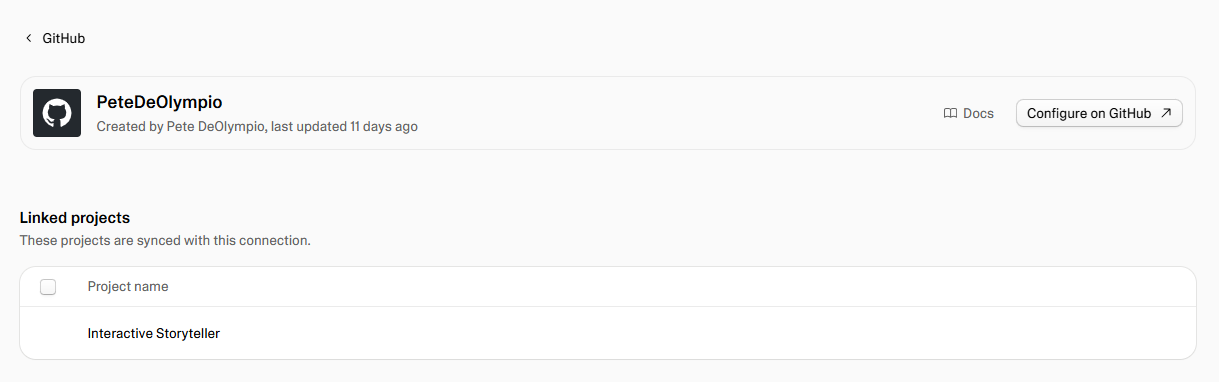

That distinction matters more than it initially seems.
If you've ever worked in a Google Doc, you've probably had the experience of having a bunch of versions of something floating around because you weren't sure which one was the "real" one. GitHub is designed to solve a much more sophisticated version of that problem for software. It keeps the project and its history together, so if an AI coding session turns your beautiful homepage into an unholy mess, you're not necessarily starting from scratch.
You don't have to publish every change
There's one other GitHub/Lovable concept that's worth understanding before you start making changes to your live website: branches.
A branch is basically a separate version of your project.
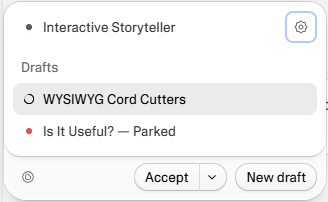
If the main branch is the version of the website you want everyone to see, you can create another branch where you experiment. Lovable calls these draft branches, and for a personal website, you can think of one as your basic dev environment.
This is useful because you don't necessarily want to make every change directly to the live site.
Maybe you want to completely redesign the homepage. Maybe you're trying a different navigation. Maybe you have an idea that could either be brilliant or look like it was designed by a committee of LinkedIn influencers.
Make a branch.
Lovable can make the changes there without immediately changing what's in production. You can look at the draft version, test it, decide that it actually sucks, and leave it there. Or, if you like it, you can merge the changes back into the main branch and make them part of the live site.
You can absolutely skip this for a personal website.
I do.
It's my website. If I ask Lovable to change something and it breaks the homepage for five minutes, the consequences are basically that three people on the internet might see a messed-up homepage. I'll survive.
But if you're building something more important, separating development from production is a very good habit to establish.
The basic idea is:
Production: the website everyone sees.
Development/draft: the version where you're allowed to screw around.
You don't need to understand Git branching to use this. Lovable handles most of the mechanics. You just need to understand why you'd want the separation in the first place.
And this is another reason I like having GitHub in the middle of the stack. You're not just handing an AI the keys to your website and hoping for the best. There's a place where the underlying project lives, there are versions of that project, and you have a way to separate experimentation from the thing you're actually publishing.
Then go to Vercel.com. Vercel is basically the thing that takes your code and turns it into an actual website people can visit. Again, you could use this to host/launch enterprise-grade cloud apps. But we're not going to. We're using it to launch a website.
Connect Vercel to the GitHub repository you just created. From here on out, GitHub is the middleman: Lovable makes changes to the code, GitHub stores those changes, and Vercel watches the repository and deploys the version you've told it to deploy.
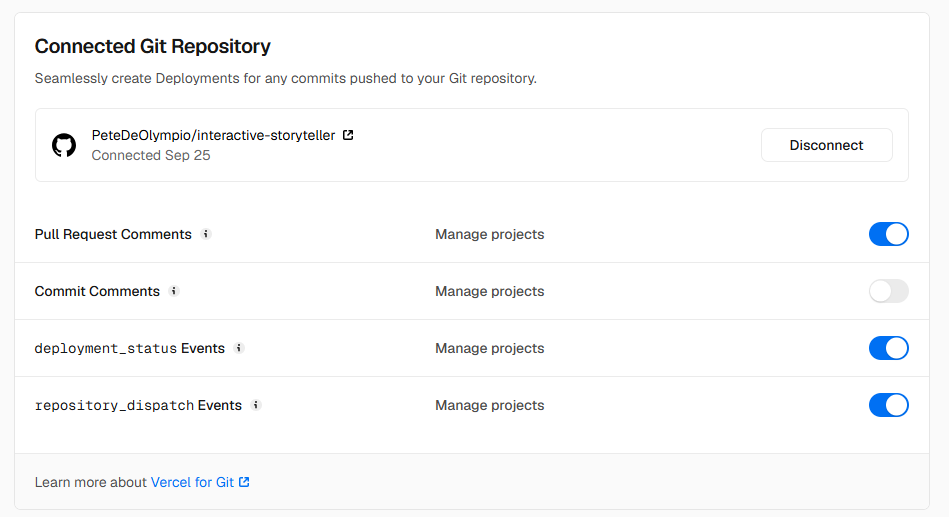
The important distinction here is that GitHub isn't your website. It's where the stuff that makes your website lives. Vercel takes that stuff and actually serves it to people on the internet.
This is also, roughly speaking, what people mean when they talk about a CI/CD pipeline, which is the more complicated version of what we're actually doing. It refers to "continuous integration and continuous delivery/deployment" and is a set of practices developers and data engineers use to automate the process of testing, moving, and deploying changes.
I've spent a decent chunk of my career working around data engineering, integrations, and other technical systems, so the basic concept isn't foreign to me. But I absolutely did not expect to ever put one into practice, even in a very simplified way.
It's pretty standard in professional software development. Instead of someone manually taking new code, testing it, moving it to a server, and hoping nothing breaks, much of that process can be automated.
In our case, we're using an almost comically simplified version of that idea: Lovable changes the code, GitHub stores it, and Vercel deploys it.
If you own a domain, this is a good time to prepare to point the DNS records at Vercel. DNS is basically the internet's address book. You own petedeolympio.com; Vercel is hosting your website; DNS tells the internet where to find it. You'll get some records from Vercel, put them into wherever you bought your domain, and eventually the two things will find each other.
In practical terms, you'll go to the company where you registered your domain, find the DNS settings, and add the records Vercel tells you to add. You don't need to understand what every record means. You just need to follow Vercel's instructions carefully.
One caveat: if you also use that domain for email, don't start deleting random DNS records because you're trying to clean things up. Those records may be doing something important for your email. You are trying to point the website at Vercel, not relocate your entire digital existence.
Now you have something kind of ridiculous: a live software-writing environment.
If you tell Lovable to write a website for your portfolio, it will absolutely go ahead and do that. It will push the code over to your GitHub repo. Vercel will see changes to the branch you've connected to it, take that code, and deploy it.
And 90 seconds later you have a homepage.
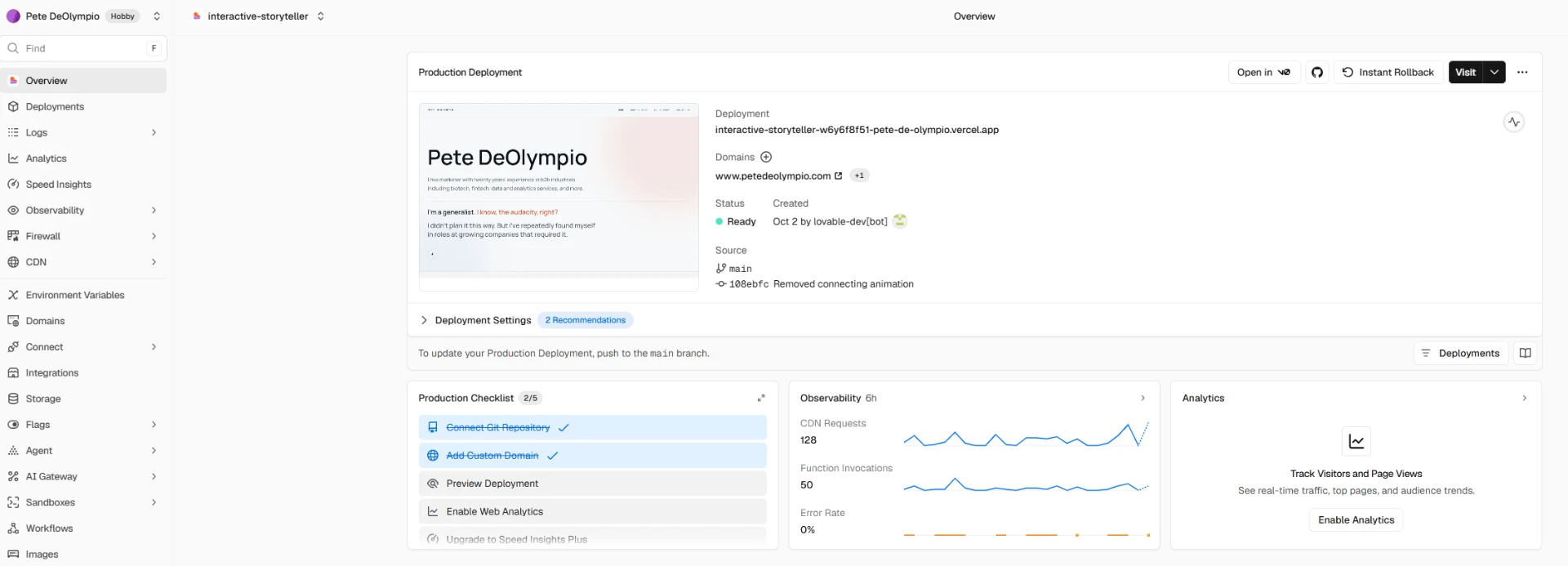
This is where the workflow starts to feel genuinely different from a traditional website builder.
You don't build the entire thing and then publish it once.
You build a version, look at it, tell Lovable what you don't like, and iterate.
Maybe the navigation is too big. Maybe the homepage looks too much like a SaaS landing page. Maybe the mobile version is terrible. Maybe you asked for something "editorial" and it interpreted that as "beige and use a gigantic serif font."
Tell it.
It changes the code, pushes the update to GitHub, and Vercel deploys the new version.
That loop is the actual product here.
You should also absolutely not do it this way.
AI is dope.
I'm writing the first draft of this in ChatGPT. 100% transparency, I even left little parenthetical notes in this draft where I need it to help me describe what GitHub does in plain language. Do I know "it houses your code"? Yes. Is that good enough an explanation for anyone? I hope not. Not for me, anyway.
And this is the part I think gets lost in a lot of the "AI can build you a website!" discussion.
Don't just ask it to build you a website.
You need to know what the website is supposed to do. Write your website.
Here is the absolute most basic framework to keep in mind.
HERO
What is the point of this? Who are you, and why should anyone care?
Tagline: Put some sauce on it. Maybe add which verticals you specialize in. If you only work with SMBs–mid-market, or if you're an advisory for Series A–C, this is a good place to put that information.
Blurb: Tell us about you, what you do, who you do it for, and why this matters to your ideal buyer. Not to you.
Your job is to speak to them the way they would speak to anyone. In their language.
This is challenging and I often struggle with it. It takes time.
The useful thing about having AI build the site is that you can change the presentation without having to change the underlying thinking. If you decide your hero isn't working, you don't have to rebuild the site. You can tell Lovable, "The positioning is right, but the hero feels too generic. Make the value proposition more prominent and reduce the visual noise."
That's a much more useful conversation than "make my website cooler."
OFFER / BODY OF WORK
If it's a business, tell us what you're offering. If it's a portfolio site, tell us what you're offering. Show the work. Explain what you actually did. Give people enough context to understand why the work matters.
Don't make AI invent your career for you.
This is probably the most important division of labor in the whole process.
You provide the substance. AI provides the machinery.
Give it your actual copy. Give it the actual case study. Give it the actual accomplishments. If something needs to be rewritten, rewrite it yourself or deliberately ask the AI to help with that specific job.
What you don't want to do is hand it a blank page and ask, "What should my website say?"
Because it will happily answer you.
It may even sound good.
That's the problem.
FOOTER
Your socials, your contact details. Simple.
That's enough to start.
Again, 100% transparency: this gets you to the beginning. This is not the "one quick trick" to having a differentiated, go-to-market-ready website in 90 minutes.
It gets you to a place where you can describe your aesthetic to Lovable, provide the type of content you want it to use (WRITE. IT. YOUR. SELF.) and iterate from there.
And there will be some amount of learning involved. You don't need to learn HTML or CSS, but you do need to become reasonably good at telling the machine what you mean.
That's a different skill.
You need to be able to look at the output and say what's wrong with it. You need to be able to describe the problem. And you need to be comfortable iterating instead of expecting the first prompt to produce the final website.
I'm not a design guy. I don't claim to be good at it. My sites are usually on the boring side, maybe a little over-reliant on text. AI tools will likely not solve this entirely.
If you have design chops, or can afford to pay someone who does, absolutely do that.
It's October of 2026. If you're reading this, I'm basically positive you can identify an AI-created logo, graphic, flyer, paragraph, etc. If you can tell, and assuming your ideal buyer isn't some suburban 70-year-old Facebook user, they can tell too.

Use it sparingly.
And if something breaks, don't panic.
You are going to ask it to make a change and occasionally get something completely different from what you expected. That's normal. Tell it what changed, tell it what you wanted instead, and let it take another shot.
So what's actually different?
Maybe you like having distinct options. And that's perfectly fine, too.
I personally like messing around with AI tools, seeing how they work together, and generally seeing what happens if I push on something. I can't come up with a particularly good or useful reason to deploy an MCP endpoint on my website. But I could if I wanted to.
And that's sort of the difference to me.
Nobody is sitting around typing raw code into a console every time they want to build something. Even professional web developers tend to get very, very good at a particular ecosystem, framework, CMS, whatever. That's not a knock on them. It's how the job works.
The difference here is that the platform is much less opinionated about what you're allowed to do.
I can build and deploy a widget pretty quickly. If I want something weird or custom, the limiting factor isn't necessarily whether I can make it. It's whether I should.
Which is actually a pretty big change.
And sure, there are downsides. Sometimes you're just staring at a blank page. I happen to like that.
I could scroll through website templates for days. It's like Netflix. There are 900 documentaries and somehow I'm convinced that if I keep scrolling, eventually I'll find the exact one I want to watch. But all of a sudden it's 12:30 AM and I haven't watched anything.
That's kind of how I feel about templates sometimes. You can spend hours looking at other people's answers to a question you haven't actually answered yourself: what do I want this thing to be?
The other side of this is your own ability to self-edit. AI, quite famously, loves to tell you how awesome your ideas are. But you need to know what good looks like to you. And, maybe more importantly, you need to know what good enough looks like.
I don't think my website is some masterpiece. I'm not submitting it for a Webby. I just happen to think it's better than what I could have built elsewhere, and I had a lot more control over getting it there.
That's really what I think is different about this.
If you're a consultant, a small business owner, a freelancer, or someone with a portfolio site, this is a pretty cheap way to buy yourself some control.
You're not publishing through a platform that has already decided what your website is supposed to look like. You're not dealing with "Powered by Wix" in your footer. You're not limited to whatever widgets your website builder happens to support. And you're not necessarily paying someone every time you want to make something slightly weird.
You're still responsible for deciding whether the thing you're making is useful, whether it looks good, and whether anyone actually needs it.
That's the part I think is genuinely different.